The Smallest Stack That Can Welcome a Customer
Launch a startup app with a custom domain, secure HTTPS, and Google sign-in, without building everything yourself.
Encore’s separate backend lets a future mobile app reuse booking logic and authorization rules. Mobile development still takes work, but need not mean rebuilding the backend.
Deploy the modular backend to a managed container host, with static frontend hosting and managed SQL. Containers package runtime dependencies for repeatable deployment. Serverless functions reduce server management, but compare costs, idle-instance startup delays, and provider dependencies before switching.
Connect your domain
The host’s temporary address works for testing. Customers need a recognizable name that stays yours when hosts change. A registrar that includes DNS hosting keeps one less service to manage. Multifactor authentication and automatic renewal protect the domain.
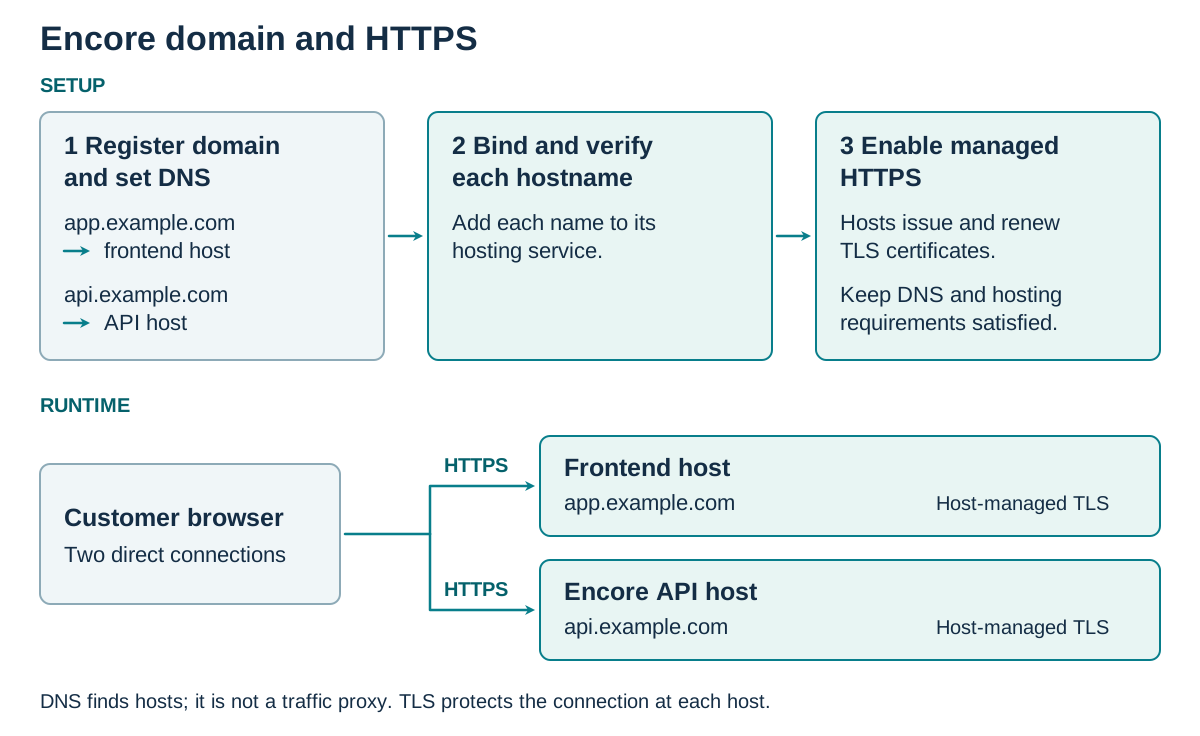
Each host’s custom-domain settings accept your frontend and API names, such as app.example.com and api.example.com. Copy its supplied records into the registrar’s DNS panel, leaving mail records untouched. DNS maps names to hosts, and these records also prove ownership. Updates take time, so wait before verifying the domain in each host.
Domain verification lets you enable managed TLS certificates and require HTTPS. TLS, Transport Layer Security, encrypts traffic, while the certificate lets browsers verify the site’s name. The provider renews certificates while its requirements remain met. Traffic between the host and backend needs protection too.
Open Encore at its new address and complete a booking. Fix certificate warnings or insecure requests before inviting customers. These exact HTTPS addresses will also keep sign-in returning people to Encore.
Rent sign-in rather than password maintenance
Customers came to book, not create another password. I would start Encore with Sign in with Google, connecting directly to Google. That assumes many customers already have an account, which early customers can help validate. Microsoft or Meta may better suit your audience. GitHub fits only when most prospective customers are developers.
Auth0 by Okta is a managed customer identity service. It offers Encore-branded sign-in, including social login buttons, when that experience matters now or later. A custom look need not mean a custom password service. The provider maintains passwords, recovery, and multifactor authentication, sparing founders that continuing security work.
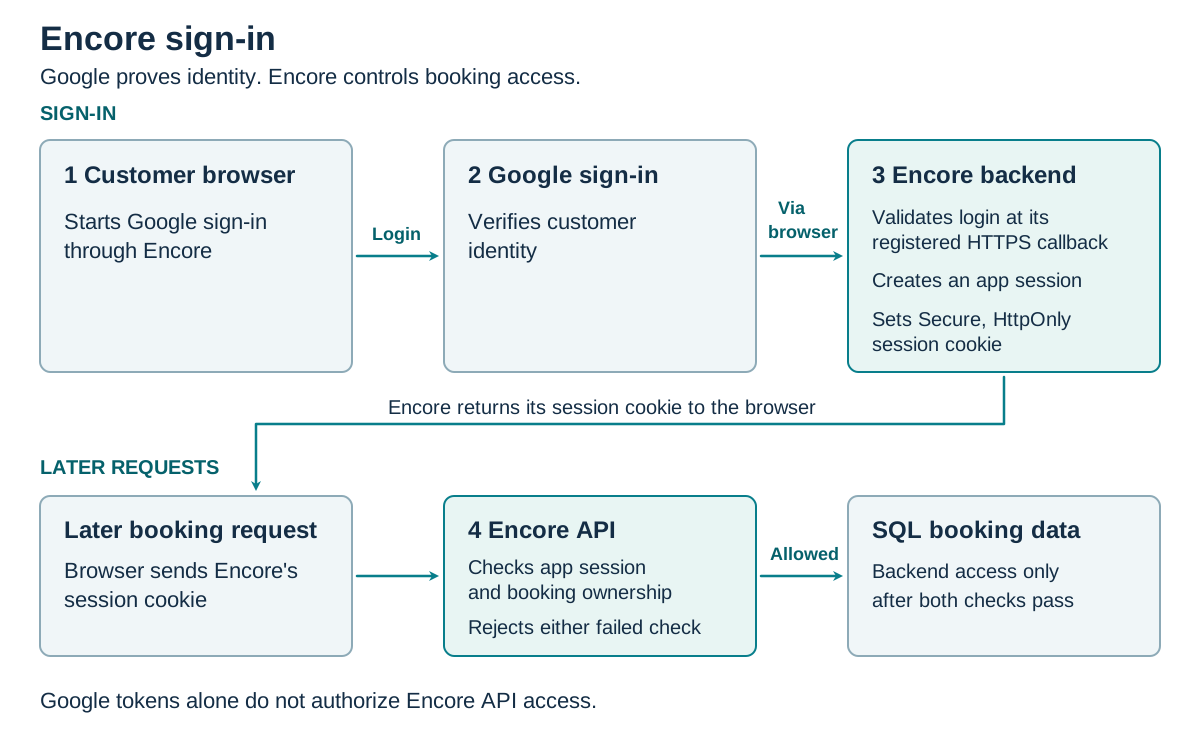
Registering Encore tells the chosen provider which application is requesting login. Its settings need the exact HTTPS callback where customers return and allowed origins identifying permitted browser callers. Separate production and staging settings, without wildcards, prevent unintended returns or test access to live resources.
The chosen provider’s SDK handles the login exchange and protocol checks through its supported flow. Encore’s backend verifies the returned identity, maps it to a user, and establishes an application session. Each later request checks the session and booking owner, so login never unlocks someone else’s tickets. Secrets stay server-side to prevent browser exposure. Permissions stay minimal because booking needs no contacts. App-level abuse controls remain ours.
| Option | Best fit | Benefit | Responsibility/cost |
|---|---|---|---|
| Managed customer identity, such as Auth0 by Okta | Encore-branded sign-in now or later | Hosted login with social options | Subscription, configuration, provider dependence |
| Login with Google, Microsoft, Meta, or GitHub | Google first for Encore, GitHub only for a mostly developer audience | Typically free basic sign-in, subject to provider terms | Manage sessions and provider differences. Consider branded login later without building a password service. |
| Enterprise workforce single sign-on, such as Okta workforce products | Business organizers needing employee access | Organizational login | Setup and licensing, distinct from customer identity |
The diagram follows direct Google sign-in. Managed identity is an optional alternative; both paths need session and booking-ownership checks.
Proof, limits, and the next constraint
- Deploy from a clean checkout using a documented command and test configuration. Each founder should be able to repeat it without relying on the other’s laptop.
- Sign in as a test customer, book, and read the booking back. Try retrieving it as another user. Denial confirms that login is not mistaken for booking ownership.
- Enable request correlation IDs, which connect log entries for one request, plus timing and error logs without tokens or personal information. Deliberately fail a test booking and find its cause, proving the logs help diagnose trouble.
- Save a tiny repeatable booking test as the booking baseline. Keep its configuration, app and dependency versions, test data, concurrency, duration, warm state, and dependency notes. Record response times, error counts, and resource usage so later comparisons use the same conditions.
Success means both founders can deploy, follow a failed booking, and safely change and redeploy the path. This small test is not capacity proof. Provider reliance and application authorization remain our responsibility.
Next, we will build the smallest booking API, keeping the endpoint inside a clearly bounded module and database access behind a defined interface. The short example will show the structure, not a production-ready solution for transactions or security.